
MMS MM7 API
When to choose MMS MM7 API
Choose MMS MM7 API when your application needs to send and receive rich media MMS using the carrier-standard MM7 SOAP protocol; choose an SMS API when your messages are text-only, or REST v2 when you need a modern JSON SMS workflow.
Overview
Our MMS API is an implementation of the standard MM7 protocol. This is a SOAP based protocol used by carriers to send and receive MMS.
This document will outline the required information needed to integrate your application with us in order to send MMS messages.
Our MMS API was developed in accordance with the latest 3GPP specification.
What the API can do
- Send MMS messages to mobile handsets using MM7
SubmitReq - Include text, image, audio, video, and SMIL content in multipart requests
- Return MM7
SubmitRspresponses with status and message IDs - Receive mobile-originated MMS messages through MM7 callback requests
- Receive MMS delivery reports through MM7 delivery report callbacks
- Validate request and callback outcomes using MM7 status codes
How it works
In practice, the API follows a SOAP-over-HTTPS workflow:
- Authenticate with HTTP Basic Authentication.
- Build an MM7 SOAP request with the required multipart MIME structure.
- Submit the request to
/mm7. - Store the returned MM7 message ID from the
SubmitRsp. - Receive MO messages and delivery reports through callback URLs that your platform acknowledges with SOAP responses.
When to use MMS MM7 API
Use MMS MM7 API when your integration needs to deliver rich media messages and your application or middleware is designed to work with MM7/SOAP message envelopes and multipart content.
For text-only messaging, use REST v2, HTTPS API, SOAP API, or SMPP depending on your application’s integration model.
Before you start
Before making your first request, confirm the following:
- Your MMS API application has been provisioned.
- You have the username and password for HTTP Basic Authentication.
- Your sending server IP address is authorised if IP allowlisting is enabled.
- Your MM7 request follows version 5.3.0 of the 3GPP MM7 specification.
- Mobile numbers are formatted in E.164 international format.
- Callback URLs are configured with Basic Authentication credentials.
First successful request path
For most implementations, the fastest way to validate connectivity and configuration is:
- Download the MM7 cURL sample request ZIP file.
- Submit the sample request file to
/mm7using the cURL example and your credentials. - Confirm the MM7
SubmitRspreturns status code1000. - Store the returned
MessageID. - Test MO and DLR callback handling with the documented SOAP response examples.
Authentication
HTTP Basic Authentication is used for all requests. If you access the API without having the correct credentials OR permission to access the API, you will get a HTTP 401 response.
We will provide you with a username and password to use. Your application username is the same as your application name on this page. If you don’t have these details, please contact support
Authorised IP Addresses
You can whitelist your servers’ IPs or IP ranges using the ‘Add IP Address’ button under “Authorised IP Addresses”
Please note: once one or more IP addresses or IP ranges have been added requests from all other IP addresses will be rejected, any attempt from an IP not in the list will receive an Authentication error.
Base URI
All API access is over HTTPS, and accessed from:
https://eziapi.com/mm7
Versions
Our implementation of MM7 has been built in accordance with version 5.3.0 of the 3gpp MM7 spec, we recommend following this for any integrations. Other versions of the spec should work but these are unsupported.
Sending An MMS To A Handset (MT)
MM7_Submit Request
POST /mm7 HTTP/1.1
Host: eziapi.com
Content-Type: multipart/related; boundary="NextPart_000_0028_01C19839.84698430"; type=text/xml;
    start="</tnn-200102/mm7-submit>"
Content-Length: nnnn
Authorization: Basic eW91ci11c2VybmFtZS1oZXJlOnlvdXItcGFzc3dvcmQtaGVyZQ==
SOAPAction: ""

--NextPart_000_0028_01C19839.84698430
Content-Type:text/xml; charset="utf-8"
Content-ID: </tnn-200102/mm7-submit>

<?xml version="1.0" ?>
<env:Envelope xmlns:env="https://schemas.xmlsoap.org/soap/envelope/">
      <env:Header>
        <mm7:TransactionID xmlns:mm7="https://www.3gpp.org/ftp/Specs/archive/23_series/23.140/schema/REL-5-MM7-1-3" env:mustUnderstand="1">
            vas00001-sub
        </mm7:TransactionID>
    </env:Header>
    <env:Body>
        <SubmitReq xmlns="https://www.3gpp.org/ftp/Specs/archive/23_series/23.140/schema/REL-5-MM7-1-3">
            <MM7Version>5.3.0</MM7Version>
            <SenderIdentification>
                <VASPID>TNN</VASPID>
                <VASID>News</VASID>
            </SenderIdentification>
            <Recipients>
                <To>
                    <Number>7255441234</Number>
                </To>
                </Recipients>
            <TimeStamp>2020-01-02T09:30:47-05:00</TimeStamp>
            <ExpiryDate>2020-01-20T09:30:47-05:00</ExpiryDate>
            <DeliveryReport>true</DeliveryReport>
            <Subject>News for today</Subject>
            <Priority>Normal</Priority>
            <Content href="cid:SaturnPics-01020930@news.tnn.com" allowAdaptations="true"/>
        </SubmitReq>
    </env:Body>
</env:Envelope>

--NextPart_000_0028_01C19839.84698430
Content-Type: multipart/mixed; boundary="StoryParts 74526 8432 2002-77645"
Content-ID:<SaturnPics-01020930@news.tnn.com>

--StoryParts 74526 8432 2002-77645
Content-Type: text/plain; charset="us-ascii"

Science news, new Saturn pictures...

--StoryParts 74526 8432 2002-77645
Content-Type: image/gif;
Content-ID:<saturn.gif>
Content-Transfer-Encoding: base64

R0lGODdhZAAwAOMAAAAAAIGJjGltcDE0OOfWo6Ochbi1n1pmcbGojpKbnP/lpW54fBMTE1RYXEFO
...

--StoryParts 74526 8432 2002-77645--
--NextPart_000_0028_01C19839.84698430--
MM7_Submit Response Example
Below is an example of a successful response we will provide to a well-formed request:
HTTP/1.1 200 OK
Content-Type: text/xml; charset="utf-8"
Content-Length: nnnn

<?xml  version="1.0" ?>
<env:Envelope xmlns:env="https://schemas.xmlsoap.org/soap/envelope/">
      <env:Header>
        <mm7:TransactionID xmlns:mm7="https://www.3gpp.org/ftp/Specs/archive/23_series/23.140/schema/REL-5-MM7-1-3" env:mustUnderstand="1">
            vas00001-sub
        </mm7:TransactionID>
    </env:Header>
    <env:Body>
        <SubmitRsp xmlns="https://www.3gpp.org/ftp/Specs/archive/23_series/23.140/schema/REL-5-MM7-1-3">
            <MM7Version>5.3.0</MM7Version>
            <Status>
                <StatusCode>1000</StatusCode>
                <StatusText>Success</StatusText>
            </Status>
            <MessageID>041502073667</MessageID>
        </SubmitRsp>
    </env:Body>
</env:Envelope>
Supported MM7_Submit Parameters
| Parameter Name | Type |
|---|---|
| MM7Schema | string |
| MM7Version | string |
| SenderIdentification | SenderIdentification |
| Recipients | Recipients |
| TimeStamp | string |
| ExpiryDate | string |
| DeliveryReport | string |
| Subject | string |
| Content | Content |
| Priority | string |
Curl Example
curl --location 'https://eziapi.com/mm7' \
  --user 'username:password' \
  --header 'SOAPAction:' \
  --header 'MIME-Version: 1.0' \
  --header 'Content-Type: multipart/related; type="text/xml"; start="<s1584671759.1672711821.Fw.msg>"; boundary=_boundary_2022113557_1584671759_F_s_bd798260630' \
  --header 'X-Mbuni-TransactionID: Mbuni-msg.1759.x9.99.16' \
  --data-binary '@MM7_curl_sample_request.txt'
MM7 Curl Sample Request Data ZIP File
Send MMS Message Example
These examples submit the same MM7 sample request file used by the cURL example above.
curl --location 'https://{apiDomainName}/mm7' \
  --user 'username:password' \
  --header 'SOAPAction:' \
  --header 'MIME-Version: 1.0' \
  --header 'Content-Type: multipart/related; type="text/xml"; start="<s1584671759.1672711821.Fw.msg>"; boundary=_boundary_2022113557_1584671759_F_s_bd798260630' \
  --header 'X-Mbuni-TransactionID: Mbuni-msg.1759.x9.99.16' \
  --data-binary '@MM7_curl_sample_request.txt'
import { readFile } from "node:fs/promises";
const requestBody = await readFile("MM7_curl_sample_request.txt");
const credentials = Buffer.from("username:password").toString("base64");
const response = await fetch("https://{apiDomainName}/mm7", {
method: "POST",
headers: {
"Authorization": `Basic ${credentials}`,
"Content-Type": 'multipart/related; type="text/xml"; start="<s1584671759.1672711821.Fw.msg>"; boundary=_boundary_2022113557_1584671759_F_s_bd798260630',
"MIME-Version": "1.0",
"SOAPAction": "",
"X-Mbuni-TransactionID": "Mbuni-msg.1759.x9.99.16"
},
body: requestBody
});
const responseBody = await response.text();import requests
headers = {
"Content-Type": 'multipart/related; type="text/xml"; start="<s1584671759.1672711821.Fw.msg>"; boundary=_boundary_2022113557_1584671759_F_s_bd798260630',
"MIME-Version": "1.0",
"SOAPAction": "",
"X-Mbuni-TransactionID": "Mbuni-msg.1759.x9.99.16",
}
with open("MM7_curl_sample_request.txt", "rb") as request_file:
response = requests.post(
"https://{apiDomainName}/mm7",
auth=("username", "password"),
headers=headers,
data=request_file,
)
response_body = response.text<?php
$requestBody = file_get_contents("MM7_curl_sample_request.txt");
$ch = curl_init("https://{apiDomainName}/mm7");
curl_setopt($ch, CURLOPT_USERPWD, "username:password");
curl_setopt($ch, CURLOPT_HTTPHEADER, [
"SOAPAction:",
"MIME-Version: 1.0",
'Content-Type: multipart/related; type="text/xml"; start="<s1584671759.1672711821.Fw.msg>"; boundary=_boundary_2022113557_1584671759_F_s_bd798260630',
"X-Mbuni-TransactionID: Mbuni-msg.1759.x9.99.16"
]);
curl_setopt($ch, CURLOPT_POST, true);
curl_setopt($ch, CURLOPT_POSTFIELDS, $requestBody);
curl_setopt($ch, CURLOPT_RETURNTRANSFER, true);
$response = curl_exec($ch);
curl_close($ch);
?>
require "base64"
require "net/http"
require "uri"

uri = URI("https://{apiDomainName}/mm7")
request = Net::HTTP::Post.new(uri)
request.basic_auth("username", "password")
request["Content-Type"] = 'multipart/related; type="text/xml"; start="<s1584671759.1672711821.Fw.msg>"; boundary=_boundary_2022113557_1584671759_F_s_bd798260630'
request["MIME-Version"] = "1.0"
request["SOAPAction"] = ""
request["X-Mbuni-TransactionID"] = "Mbuni-msg.1759.x9.99.16"
request.body = File.binread("MM7_curl_sample_request.txt")

response = Net::HTTP.start(uri.hostname, uri.port, use_ssl: true) do |http|
  http.request(request)
end
import java.net.URI;
import java.net.http.HttpClient;
import java.net.http.HttpRequest;
import java.net.http.HttpResponse;
import java.nio.charset.StandardCharsets;
import java.nio.file.Path;
import java.util.Base64;
String token = Base64.getEncoder()
.encodeToString("username:password".getBytes(StandardCharsets.UTF_8));
HttpRequest request = HttpRequest.newBuilder()
.uri(URI.create("https://{apiDomainName}/mm7"))
.header("Authorization", "Basic " + token)
.header("Content-Type", "multipart/related; type=\"text/xml\"; start=\"<s1584671759.1672711821.Fw.msg>\"; boundary=_boundary_2022113557_1584671759_F_s_bd798260630")
.header("MIME-Version", "1.0")
.header("SOAPAction", "")
.header("X-Mbuni-TransactionID", "Mbuni-msg.1759.x9.99.16")
.POST(HttpRequest.BodyPublishers.ofFile(Path.of("MM7_curl_sample_request.txt")))
.build();
HttpResponse<String> response = HttpClient.newHttpClient()
.send(request, HttpResponse.BodyHandlers.ofString());using System.Net.Http.Headers;
using System.Text;
using var client = new HttpClient();
var token = Convert.ToBase64String(Encoding.UTF8.GetBytes("username:password"));
var requestBody = await File.ReadAllBytesAsync("MM7_curl_sample_request.txt");
var request = new HttpRequestMessage(HttpMethod.Post, "https://{apiDomainName}/mm7");
request.Headers.Authorization = new AuthenticationHeaderValue("Basic", token);
request.Headers.TryAddWithoutValidation("MIME-Version", "1.0");
request.Headers.TryAddWithoutValidation("SOAPAction", "");
request.Headers.TryAddWithoutValidation("X-Mbuni-TransactionID", "Mbuni-msg.1759.x9.99.16");
request.Content = new ByteArrayContent(requestBody);
request.Content.Headers.TryAddWithoutValidation("Content-Type", "multipart/related; type=\"text/xml\"; start=\"<s1584671759.1672711821.Fw.msg>\"; boundary=_boundary_2022113557_1584671759_F_s_bd798260630");
var response = await client.SendAsync(request);
var responseBody = await response.Content.ReadAsStringAsync();SMIL File
Synchronized Multimedia Integration Language is a World Wide Web Consortium recommended Extensible Markup Language (XML) markup language to describe multimedia presentations. It defines markup for timing, layout, animations, visual transitions, and media embedding, among other things. SMIL allows presenting media items such as text, images, video, audio, links to other SMIL presentations, and files from multiple web servers. SMIL markup is written in XML, and has similarities to HTML.
You may wish to provide your own SMIL file as part of your MM7_submit.request, this option is available but is not mandatory. Our system will automatically generate a SMIL file for you if one is not provided.
Some file types may require that a SMIL file is submitted, if testing fails try again including a SMIL file.
SMIL File Example
Content-ID: <presentation>
Content-Type: application/smil

<?xml version="1.0"?>
<smil><!--The SMIL file must start with a <smil> tag and end with the </smil> closing tag.-->
  <head> <!-- SMIL file header, specify meta information in the multimedia presentation-->
    <meta name="author" content="Spoon"/>
  </head>
  <body>
    <par>
      <image src="cid:000001.png"/>
    </par>
  </body>
</smil>
--_boundary_1005702395_1584671759_W_m_bd391555849--

--_boundary_2022113557_1584671759_F_s_bd798260630--
Response Status Codes
Classes
| Response Class | Description |
|---|---|
| 1xxx | Successful operation |
| 2xxx | Client errors |
| 3xxx | Server errors |
| 4xxx | Service errors |
Status Codes
| Status Code | Status Text | Description |
|---|---|---|
| 1000 | Success | This code indicates that the request was executed completely |
| 2000 | Client error | Client made an invalid request |
| 2002 | Address Error | The address supplied in the request was not in a recognized format or the MMS Relay/Server ascertained that the address was not valid for the network because it was determined not to be serviced by this MMS Relay/Server. When used in response-result, and multiple recipients were specified in the corresponding push submission, this status code indicates that at least one address is incorrect. |
| 2004 | Multimedia content refused | The server could not parse the MIME content that was attached to the SOAP message and indicated by the Content element or the content size or media type was unacceptable. |
| 2007 | Message format corrupt | An element value format is inappropriate or incorrect. |
| 3003 | Multiple addresses not supported | The MMS Relay/Server does not support this operation on multiple recipients. The operation MAY be resubmitted as multiple single recipient operations. |
Receiving An MMS From A Handset (MO) Via Callback
Callback Requests
MMS messages from handsets are sent back to your platform via a deliver request made using MM7 SOAP request “DeliverReq”. Your platform must reply with a SOAP response “DeliverRsp”, indicating that the message was successfully received.
Authentication
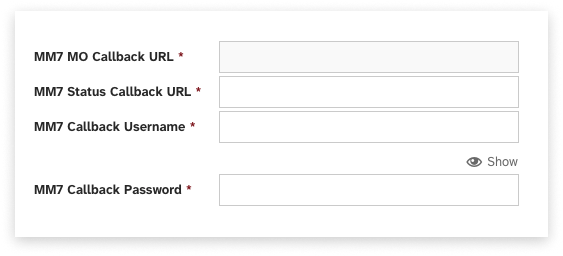
We require that basic authentication is configured for all callback URLs, even if it is not used or is ignored by your platform. Credentials need be added to your gateway config page.
MM7_deliver Request
Our systems will send a MM7_deliver.req request to your MO call back URL:
<?xml version="1.0" encoding="UTF-8" standalone="yes"?>
<soap-env:Envelope xmlns:ns1="https://schemas.xmlsoap.org/soap/envelope/" xmlns=
"https://www.3gpp.org/ftp/Specs/archive/23_series/23.140/schema/REL-6-MM7-1-4">
<soap-env::Header>
   <TransactionID soap-env:mustUnderstand="1">1000001</TransactionID>
</soap-env::Header>
<soap-env::Body>
   <DeliverReq>
      <MM7Version>5.3.0</MM7Version>
      <LinkedID>1000001</LinkedID>
      <Sender>
         <Number>1617423433</Number>
      </Sender>
      <Recipients>
         <To>
         <Number>111122</Number>
         </To>
      </Recipients>
      <TimeStamp>2014-04-14T16:15:23.414Z</TimeStamp>
      <Priority>Normal</Priority>
      <Content href="cid:default.cid" allowAdaptations="true"/>
   </DeliverReq>
</soap-env:Body>
</soap-env:Envelope>
MM7_deliver Response Example
The following is an example response your system will need to provide to acknowledge receiving our callback request:
<?xml version="1.0" encoding="UTF-8" ?>
<soap-env:Envelope xmlns:soap-env="https://schemas.xmlsoap.org/soap/envelope/" xmlns:xsi=
"https://www.w3.org/2001/XMLSchema-instance" xmlns:xsd="https://www.w3.org/2001/XMLSchema">
<soap-env:Header>
   <TransactionID xmlns="https://www.3gpp.org/ftp/Specs/archive/23_series/23.140/schema/REL-6-MM7-1-4" soap-env:mustUnderstand="1">1000001</TransactionID>
</soap-env:Header>
<soap-env:Body>
   <DeliverRsp xmlns="https://www.3gpp.org/ftp/Specs/archive/23_series/23.140/schema/REL-6-MM7-1-4">
      <MM7Version>5.3.0</MM7Version>
      <Status>
         <StatusCode>1000</StatusCode>
         <StatusText>Successfully received MMS</StatusText>
      </Status>
   </DeliverRsp>
</soap-env:Body>
</soap-env:Envelope>
Receiving Delivery Receipts (DLRs) via Callback
Callback Requests
Delivery Receipts (DLRs) sharing the status of your MT message requests to handsets are sent back to your platform via a delivery report request made using MM7 SOAP request “DeliveryReportReq”. Your platform must reply with a SOAP response “DeliveryReportRsp”, indicating that the delivery report was successfully received.
Authentication
We require that basic authentication is configured for all callback URLs, even if it is not used or is ignored by your platform. Credentials need be added to your gateway config page.
MM7_DeliveryReport Request
Our systems will send a MM7_DeliveryReport.req request to your MO call back URL:
<?xml version="1.0" encoding="UTF-8" standalone="yes"?>
<soap-env:Envelope xmlns:soap-env="https://schemas.xmlsoap.org/soap/envelope/" xmlns=
"https://www.3gpp.org/ftp/Specs/archive/23_series/23.140/schema/REL-6-MM7-1-4">
<soap-env:Header>
   <TransactionID soap-env:mustUnderstand="1">10000001</TransactionID>
</soap-env:Header>
<soap-env:Body>
   <DeliveryReportReq>
      <MM7Version>5.3.0</MM7Version>
      <MessageID>369500617770864640</MessageID>
      <Recipient>
         <Number>16175550123</Number>
      </Recipient>
      <Sender>
         <Number>111122</Number>
      </Sender>
      <Date>2015-03-16T14:03:51.749Z</Date>
      <MMStatus>Retrieved</MMStatus>
      <StatusText>Success</StatusText>
   </DeliveryReportReq>
</soap-env:Body>
</soap-env:Envelope>
MM7_DeliveryReport Respose Example
The following is an example response your system will need to provide to acknowledge receiving our callback request:
<?xml version="1.0" encoding="UTF-8" ?>
<soap-env:Envelope xmlns:soap-env="https://schemas.xmlsoap.org/soap/envelope/" xmlns:xsi=
"https://www.w3.org/2001/XMLSchema-instance" xmlns:xsd="https://www.w3.org/2001/XMLSchema">
<soap-env:Header>
   <TransactionID xmlns="https://www.3gpp.org/ftp/Specs/archive/23_series/23.140/schema/REL-6-MM7-1-4" soap-env:mustUnderstand="1">1000001</TransactionID>
</soap-env:Header>
<soap-env:Body>
   <DeliveryReportRsp xmlns="https://www.3gpp.org/ftp/Specs/archive/23_series/23.140/schema/REL-6-MM7-1-4">
      <MM7Version>5.3.0</MM7Version>
      <Status>
         <StatusCode>1000</StatusCode>
         <StatusText>Successfully Received Delivery Report.</StatusText>
      </Status>
   </DeliveryReportRsp>
</soap-env:Body>
</soap-env:Envelope>
DLR Status Codes
| Status | Description |
|---|---|
| Expired | The mobile operator could not contact the handset before reaching the expiry time. Each mobile operator has their own expiry times after which they will stop trying to send messages such as an MMS. |
| Forwarded | The end user forwarded the MMS to another address without retrieving it. |
| Indeterminate | The mobile operator could not determine if the message was delivered correctly. This occurs when the handset cannot return an MMS delivery report. |
| Rejected | Technical issues/System or Server errors/Content blocked by Mobile Operator/Exceeded MMS Size/ Other errors |
| Retrieved | The message was successfully sent to the handset. |
Known Supported File Formats
The list of media types below has been tested internally and worked with the handsets and carriers available at the time. It should be taken as a list of the most compatible media types but results may vary.
Images
| File Type | Media Type | Compatability | Notes |
|---|---|---|---|
| JPEG | image/jpeg | Full | |
| BMP | image/bmp | Full | |
| GIF87a, GIF89a | image/gif | Full | |
| PNG | image/png | Full | |
| TIFF | image/tiff | Full | |
| HEIC | image/heic | Partial | Compatibility depends upon receiving device |
Audio
| File Type | Media Type | Compatability | Notes |
|---|---|---|---|
| AMR | audio/amr | Full | |
| MP3 | audio/mpeg3 | Full | |
| MID, MIDI | audio/midi | Full | |
| WAV | audio/wav | Full | |
| AU | audio/basic | Full |
Video
| File Type | Media Type | Compatability | Notes |
|---|---|---|---|
| MPEG, MPG | image/mp4 | Full | |
| MP4 | image/mpeg | Full | |
| 3GP | image/3gpp | Full | |
| AVI | video/msvideo, video/avi, application/x-troff-msvideo, video/x-msvideo | Full | |
| MOV | image/quicktime | Full |
Other
| File Type | Media Type | Compatability | Notes |
|---|---|---|---|
| TXT, TeXT, US-ASCII | text/plain | Full | |
| iCalendar, iCal | text/calendar | Partial | Compatibility depends upon receiving device |
| VCF, VCARD | text/vcard | Partial | Compatibility depends upon receiving device |
Media Sample Pack
Below is a sample of common file types to assist with integration tests.
Help
Having trouble integrating with any of our services? Visit our helpdesk at https://my.ezitxt.com/docs/ or contact support and we’ll help you sort it out.